Settings → SMS Settings. Admin only. You connect your own account with MessageMedia, SMS Broadcast, SMSGlobal or Mobile Message, and your provider bills you directly.
Push notifications remain the primary channel for order updates and are unaffected by this.
Set it up
- Choose your SMS Provider *.
- Gateway Name * — a short label to identify it, up to 20 characters.
- Enter the credentials. The two boxes relabel themselves for the provider:
- SMS Broadcast — Username and Password
- MessageMedia — API Key and API Secret
- SMSGlobal — REST API Key and REST API Secret, from MXT → Integrations → REST API. They are not your MXT login.
- Mobile Message — API Username and API Password, from Settings → API. Keep them in that order: the API Username goes in the top box.
- Select Save Configuration.
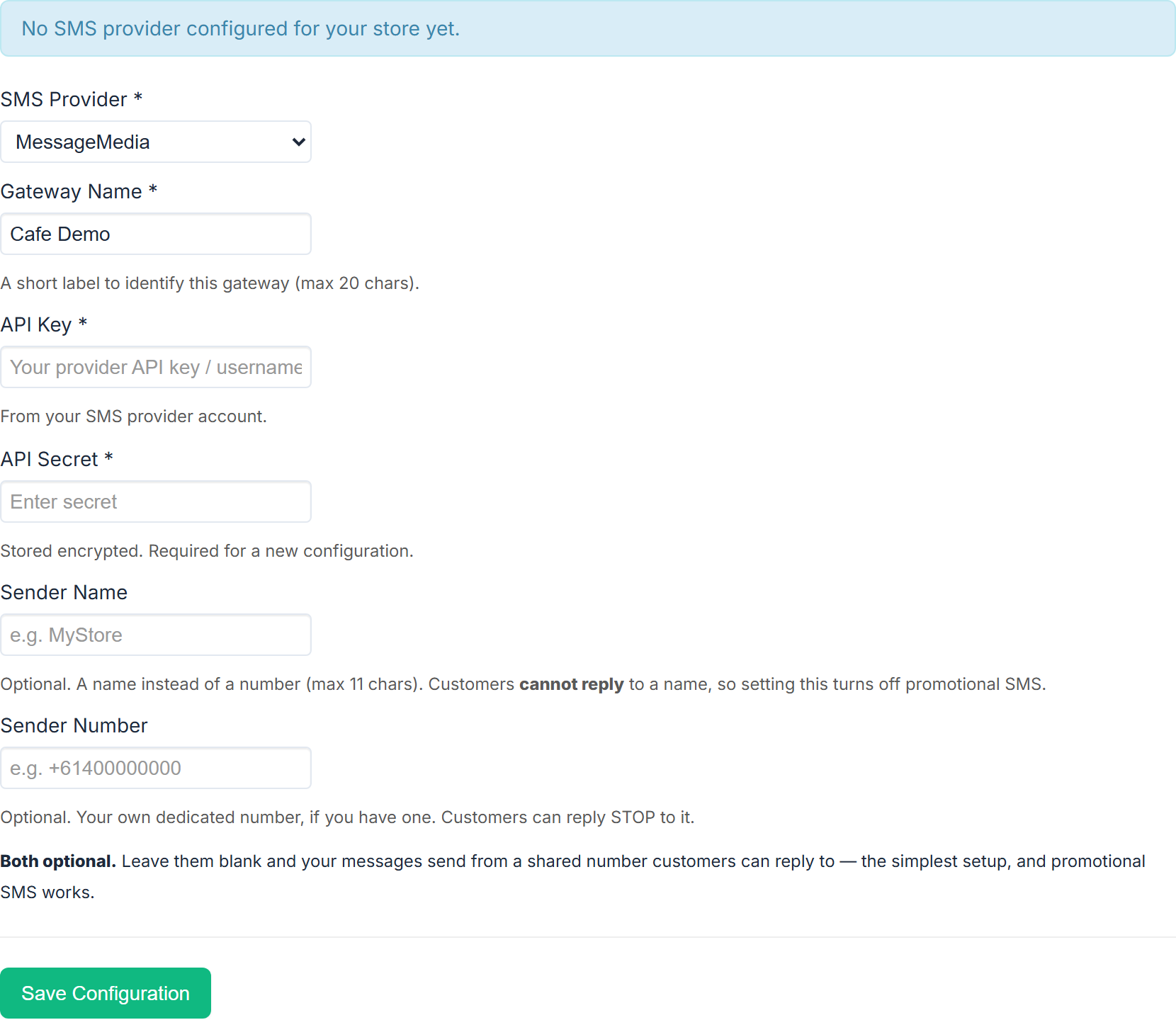
The secret is stored encrypted. When editing an existing gateway, leave the secret box blank to keep the current one.
Leave Sender Name blank
Sender Name and Sender Number are both optional, and the recommended setup is to leave both empty:
Both optional. Leave them blank and your messages send from a shared number customers can reply to — the simplest setup, and promotional SMS works.
A Sender Name puts your business name in place of a number, up to 11 characters — but customers cannot reply to a name, so setting one turns promotional SMS off. Customers must be able to reply STOP.
If you have your own dedicated number, put it in Sender Number. Note that a Sender Name overrides a Sender Number, so setting both means the number is never used.
Mobile Message: leave both blank and saving fills in your account's shared number for you. A Sender Name has to be an active Sender ID on your Mobile Message account, registered with ACMA. A Sender Number has to be typed exactly as it appears there. Mobile Message rejects one it doesn't have.
Activate it
Saving is not enough. While a saved gateway is off you see:
Inactive: Configuration exists but is not active. Activate it (after an optional test) to start using your gateway.
Select Send Test SMS if you want to check it, then Activate. A live gateway shows Active: Your SMS provider is active and used for your store's SMS.
Deactivate turns it off again.
SMS failover
Once a gateway is active, a checkbox appears: Use SMS when a push notification can't be delivered — "When a customer's order-status push reaches no device, send them an SMS instead." It stays disabled until the gateway is activated.
Configuration Status
The box at the bottom is the quickest diagnosis:
- Active: Yes / No
- Can send promotional SMS: Yes / No. A No names the reason — "clear the Sender Name to enable" or "activate this gateway first".
- SMS failover: On / Off
Below it, SMS Statistics (Last 30 Days) shows SMS sent and Billable.
Cost and compliance
Your business name, contact details and a "Reply STOP" line are added to every promotional SMS because the law requires them, and that text counts towards the message length — so a message may use more than one SMS unit. The preview on the Announcements page shows exactly what will be sent and what it will cost.
Section 14 of the merchant terms sets out your obligations as the sender.