When six orders each have a burger on them, what the grill needs to know is "six burgers", not "six orders". The all-day bar counts the items you choose across every open order on the screen.
Where to find it
The all-day bar runs along the bottom of the screen. It shows each tracked item with how many are still to make, and updates as orders arrive, as you strike items off and as you bump orders. An item with none outstanding stays on the bar, faded, at 0.

The bar is switched on by default, but nothing shows until a manager picks the items to track. It does not show on phone-sized screens.
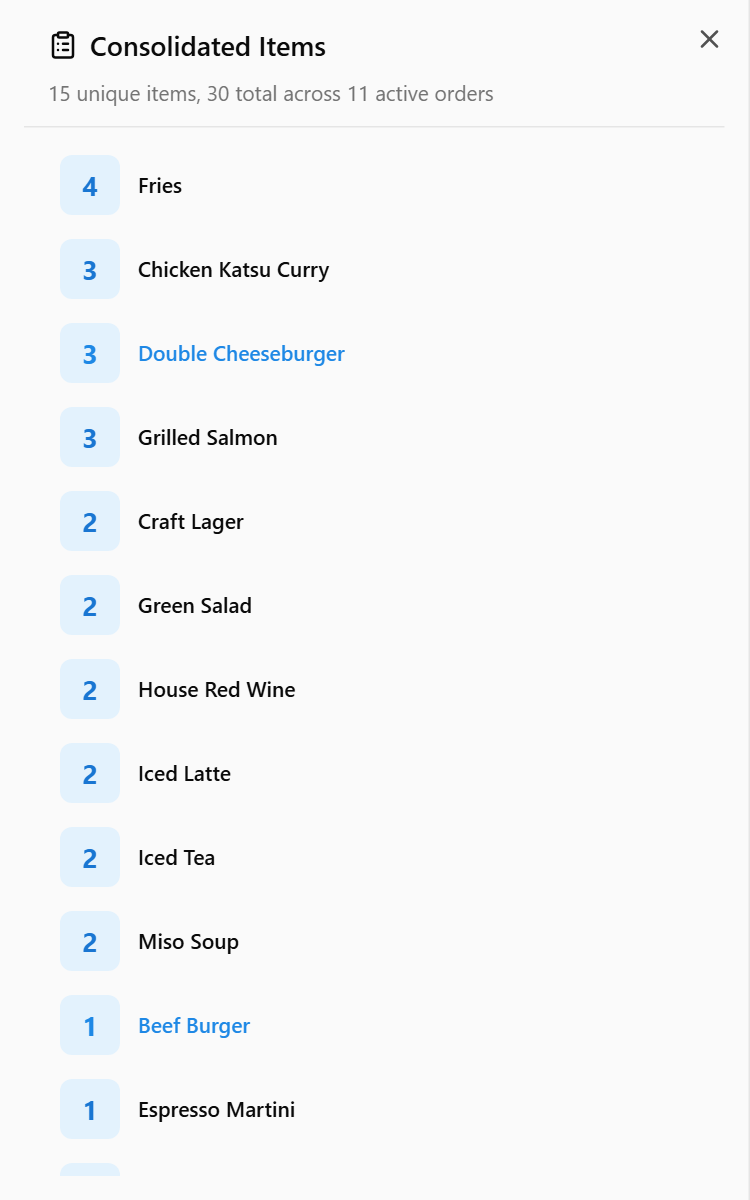
For the full breakdown, tap ITEMS in the sidebar — or press C on a keyboard. The Consolidated Items panel lists every outstanding item across the open orders, the biggest count first. It needs no setting up.
Choose which items are counted
The bar tracks up to 32 items. To change the list:
- Open Settings → Kitchen → All Day. If you are signed in as staff, a manager has to unlock it first — see Unlock settings that need a manager PIN.
- Tap Add Tracked Items, or Add More Items once the list has some.
- Choose how to match the item name: Exact for one item, or Contains or Starts with to count every variant of a product together.
- Tap an item under Currently in queue or Recent items (30 days). Or type a name under Or enter manually and tap Add.
- Under Sort Order, choose Manual to order the list yourself with the arrows, A–Z, or Qty to put the biggest count first.
The list is shared by every kitchen screen at the venue.
Turning it off
If the screen is tight for space, switch off All Day Items at the top of Settings → Kitchen → All Day. The bar disappears; the Consolidated Items panel still works.