Completed, rejected and void orders stay on the screen's recall list after they leave the board. Recall brings one back.
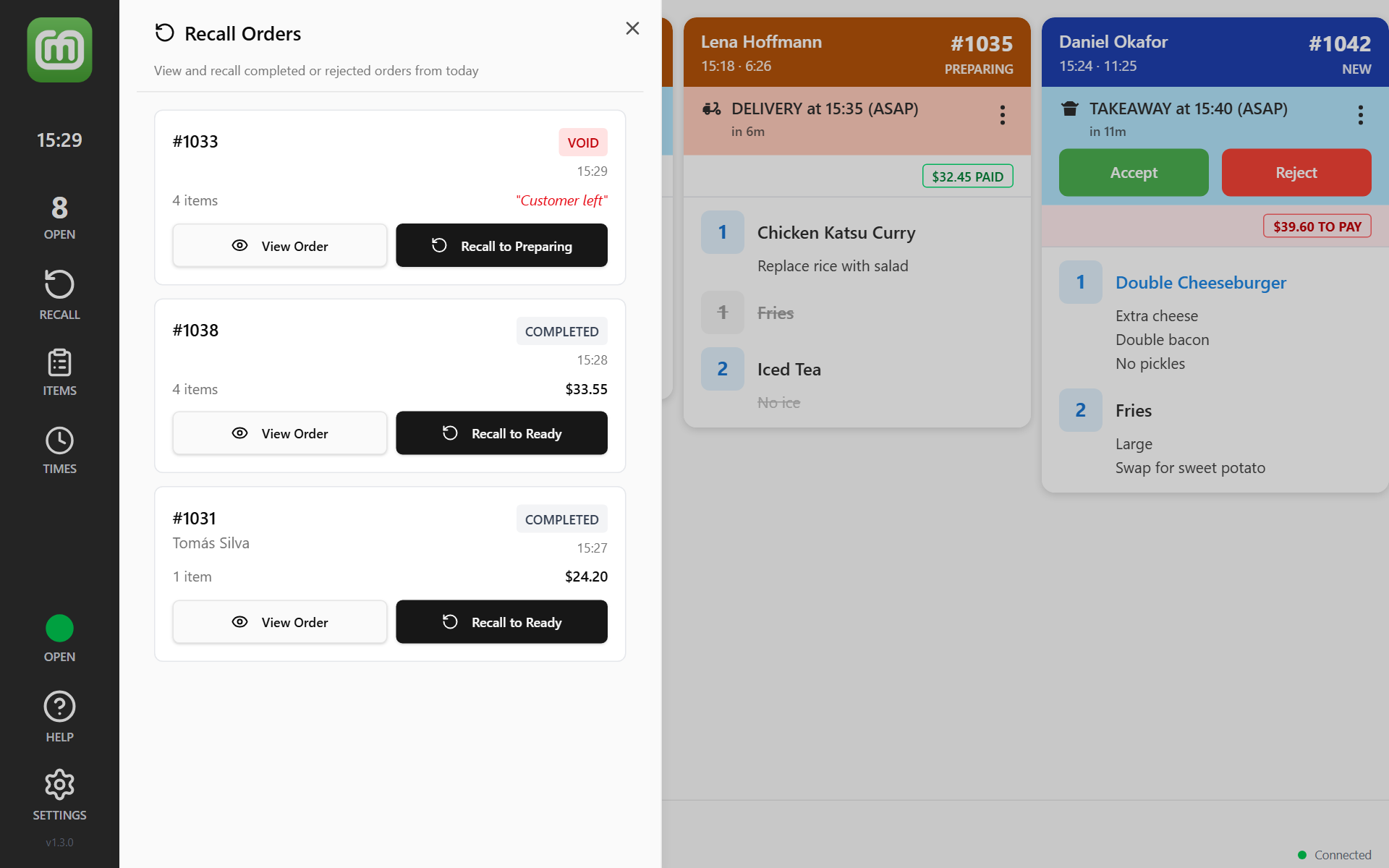
Recall an order
- Tap RECALL in the sidebar on the left. On a keyboard, press R. The Recall Orders panel opens.
- Find the order. The most recent is at the top. Each one shows its number, the customer, COMPLETED, REJECTED or VOID, and how many items it has. Tap View Order to check it first.
- Tap the Recall to button. It names the stage the order goes back to, such as Recall to Ready.
- Tap Recall Order to confirm.
The order returns to the board at that stage and flashes so you can find it. It can be worked and bumped again as normal. Orders already in progress are not disturbed.
What the list holds
The panel shows the 50 most recently cleared orders, newest first. It is not a full order history. For older orders, look in the back office.
No orders to recall today means there is nothing to bring back yet.
Rejected and void orders
A rejected or void order shows the reason given for it, in red, where the total would be. You can see why before you bring it back. A rejected order comes back as New, with its Accept and Reject buttons.
A void order you bring back returns on this screen only. Other screens and the back office still show it as void. See Void an order, or refund it.