Void Order cancels an order the kitchen has already accepted. Refund gives money back on a paid online order and leaves it on the board. Signed in as staff, both ask a manager for their PIN — see Unlock settings that need a manager PIN.
Void an order
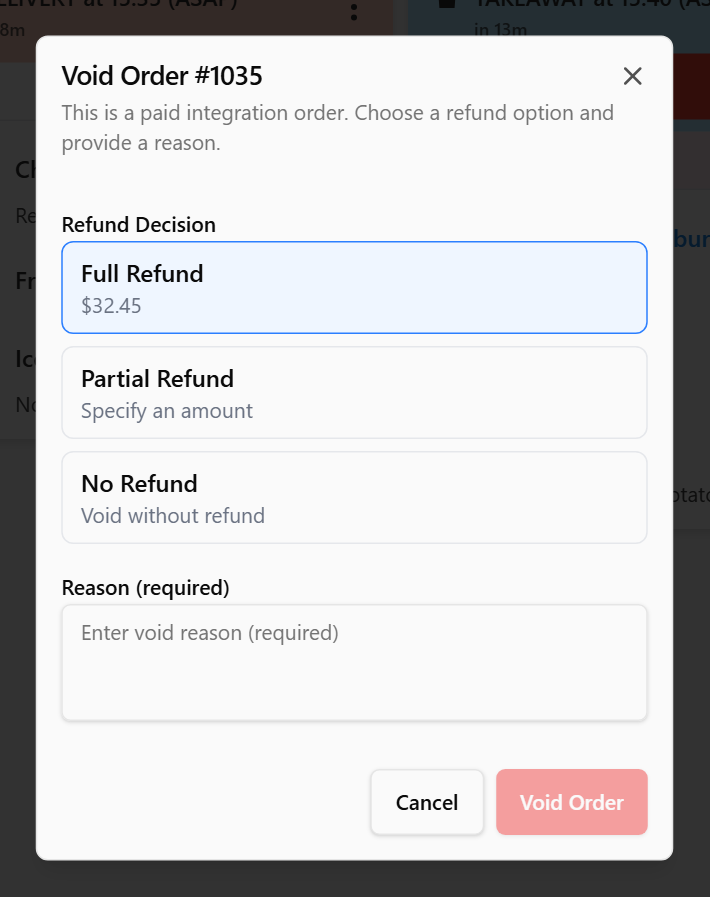
- Tap ⋮ on the order card, then Void Order. It is there for Accepted, Preparing and Ready orders. A New order is turned down with Reject instead.
- On a paid online order, the dialog reads This order has been paid. Choose whether to refund it, and give a reason. Pick a Refund Decision: Full Refund, Partial Refund (type the amount in Refund Amount ($)) or No Refund. Nothing is picked to start with, and Void Order stays greyed out until you choose.
- Type a reason. Void Order stays greyed out until you do.
- Tap Void Order.
An unpaid order, or one from your POS, has no refund choice — just the reason.
Refund without cancelling
While a paid online order is on the board, tap ⋮ → Refund. Pick Full Refund or Partial Refund, type a reason, and tap Process Refund. Nothing changes on the screen until the server accepts the refund. Then Order refunded (or Partial refund made) confirms it. If it was refused, Not refunded says why.
An order is refunded once. After that, Refund leaves the menu and Void Order offers no refund.
What happens to the money
The display never touches the customer's card. It records the refund and sends it, with any void, to the online ordering system the order came from. That system decides whether the card is refunded and what the customer is told, and may pass your reason on — write it for the customer. Check in the back office that the refund went through.
Voiding a POS order tells the POS nothing. Void or refund the sale in the POS too.
A void works without internet: the screen sends it once it is back online. A refund needs the internet, so refund an order while the screen is online. Offline, Refund says Refunds need an internet connection. Try again when this screen is back online.
When a paid order is voided while a refund cannot be made, the dialog offers no refund choice and says why: This order has been paid. Refunds need the internet, and this screen can't reach the server right now. Voiding it now doesn't refund it. — or, for a sign-in made while the screen was offline, To refund it, sign in again with the internet on. Voiding it then cancels the order without refunding it. To give the customer their money back, refund it in the back office.
Done
A void order leaves the board. RECALL lists it as VOID, with your reason in red.
After a refund the card still reads PAID. View Order shows REFUNDED or PART REFUND, with the amount and time.
You can recall a void order, but only on this screen. Other screens, the back office and the ordering system keep it void, and a refund stands. See Bring back an order you have already cleared.
If something is not right
| You see | What it means |
|---|---|
| Amount must be between $0.01 and the order total | A partial refund must be more than zero and no more than the order total |
| No Refund in the menu | The order is new, from your POS, unpaid, free, or already refunded |
| No managers or admins on this screen | The display has no manager PINs to check. If it is offline, connect it and try again. If it is online, nobody here is a manager or admin yet: one is added in the back office |