On a long order it is easy to lose your place. Tapping an item strikes a line through it so you can see at a glance what is left.
Strike one off
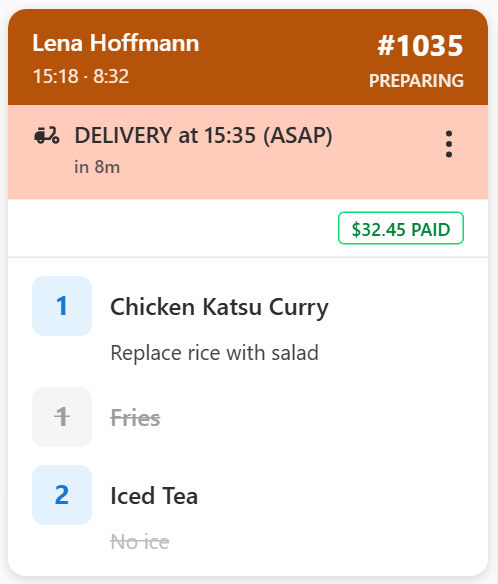
Tap the item. A line appears through it and it turns grey. Its modifiers are struck off with it.
Tap it again to remove the line if you tapped the wrong one.
Modifiers work the same way — tap the modifier line on its own to strike just that, leaving the item itself untouched.
Some POS orders sent through the Virtual Printer show as a copy of the printed docket rather than a list of items. Those cannot be struck off.
What it does and does not do
Striking an item off does not move the order forward. The order stays at its current stage until you bump it. Nothing is sent back to the POS.
A struck item drops out of the all-day bar and the Consolidated Items counts, so they show only what is still to make.
It is a working note for the kitchen. The mark is saved on the screen, so it is not lost if the app restarts mid-service.
Making long orders easier to read
A manager can colour particular items, and words such as "no" or "gluten" in modifiers, under Settings → Kitchen → Styling. A struck item loses its colour, so what is left stands out. See Highlight items and allergens in colour.