Start the till at the beginning of a shift so the POS knows how much cash is in the drawer. You confirm the float the last close left, or count it.
You only see the till once an admin has turned on cash management. See Turn on the till (cash management) for your POS.
When the POS asks
After you sign in with your staff PIN, the POS shows Start the till if this device's till hasn't been started. On a POS without staff PINs, it asks when the POS starts.
It shows the float carried from the last close, for example "Float carried from the last close (Z #41, yesterday 3:12 pm, Sam):" and the amount. A till that has never been closed says "No float carried: this till hasn’t been closed before." and offers $0.00.
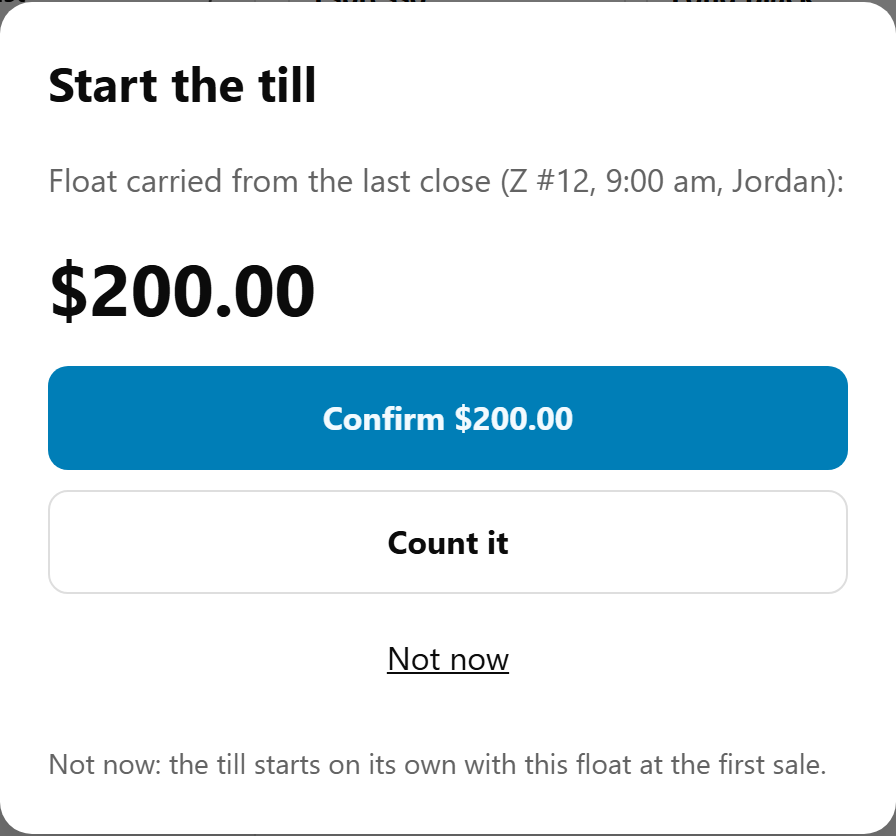
Confirm the float
If the drawer holds the float the last close left, select Confirm. The button shows the amount, for example Confirm $200.00.
Count it
- Select Count it.
- Count the cash in the drawer and type the total in Cash in the drawer now.
- Select Start with $…, which shows the amount you typed. Back returns to the carried float.
Done looks like: the prompt closes and the top bar's Till button reads Till · open. Select it to see, for example, "Open since 6:58 am · opened by Sam · float $200.00".
Not now
Not now puts it off until the next person signs in. On a POS without staff PINs, until the POS is reloaded. Selling isn't held up: "Not now: the till starts on its own with this float at the first sale."
A till started by a sale reads "Started by a sale" in the Till sheet, with the carried float. The next person to sign in is asked again, and can still confirm or count the float. Once cash has been paid in, paid out or refunded on it, the POS stops asking: from then on, the float stays as it was.
If that happens while someone is counting, the POS says so: The till was already going, "…and cash has moved since, so the float stays at that. Your count wasn't used." Select OK. If the drawer really holds a different amount, it shows as over or short when you close the till.
Start it later
Select Till in the top bar. A till nobody has started says "Nobody has started the till since it was last closed. The first sale starts it with the float carried over ($200.00)." Select Start the till, then Confirm or Count it.
Who can start the till
Any staff member signed in with their own PIN. A manager isn't needed. The till records who started it and how: confirmed or counted. On a POS without staff PINs, it records the device. See Sign in to the POS with your staff PIN, switch and lock.
If something is not right
| What you see | What to do |
|---|---|
| "Sign in with your staff PIN first." | Your sign-in has ended, so the POS locks. Sign in again and start the till. |
| "That amount is too large." | The most you can enter is $20,000. Check the amount. |
| "The till could not be started. Please try again." | Try again. If it keeps happening, contact us. |
| The carried float is wrong | Select Count it and type what is really in the drawer. |
| No Start the till and no Till button | Cash management is off for your store. An admin turns it on in Users → POS devices. |