Check how the till is going without closing it. The Till sheet shows the takings so far and the cash that should be in the drawer. Print X prints them as an X report, and the till stays open.
Open the till
Select Till in the POS top bar. It reads Till · open while the till is open.
The top of the sheet says when it opened, who opened it and the float, for example "Open since 6:58 am · opened by Sam · float $200.00". A till nobody started reads "Started by a sale".
Select ✕ to hide the sheet. That leaves the till open. Close till is the cash-up.
Takings so far (X)
Each tender taken on this POS device, with the number of payments and the amount, then the Total:
- Cash
- EFTPOS: the pinpad linked to the POS
- Card (own terminal): card payments taken on a terminal that isn't linked to the POS
- Other / not recorded
Cash drawer
Opening float, + Cash sales, − Cash refunds when there are any, and each paid in and out with its reason, note and who did it. The last line is Expected in drawer: the cash the drawer should hold now.
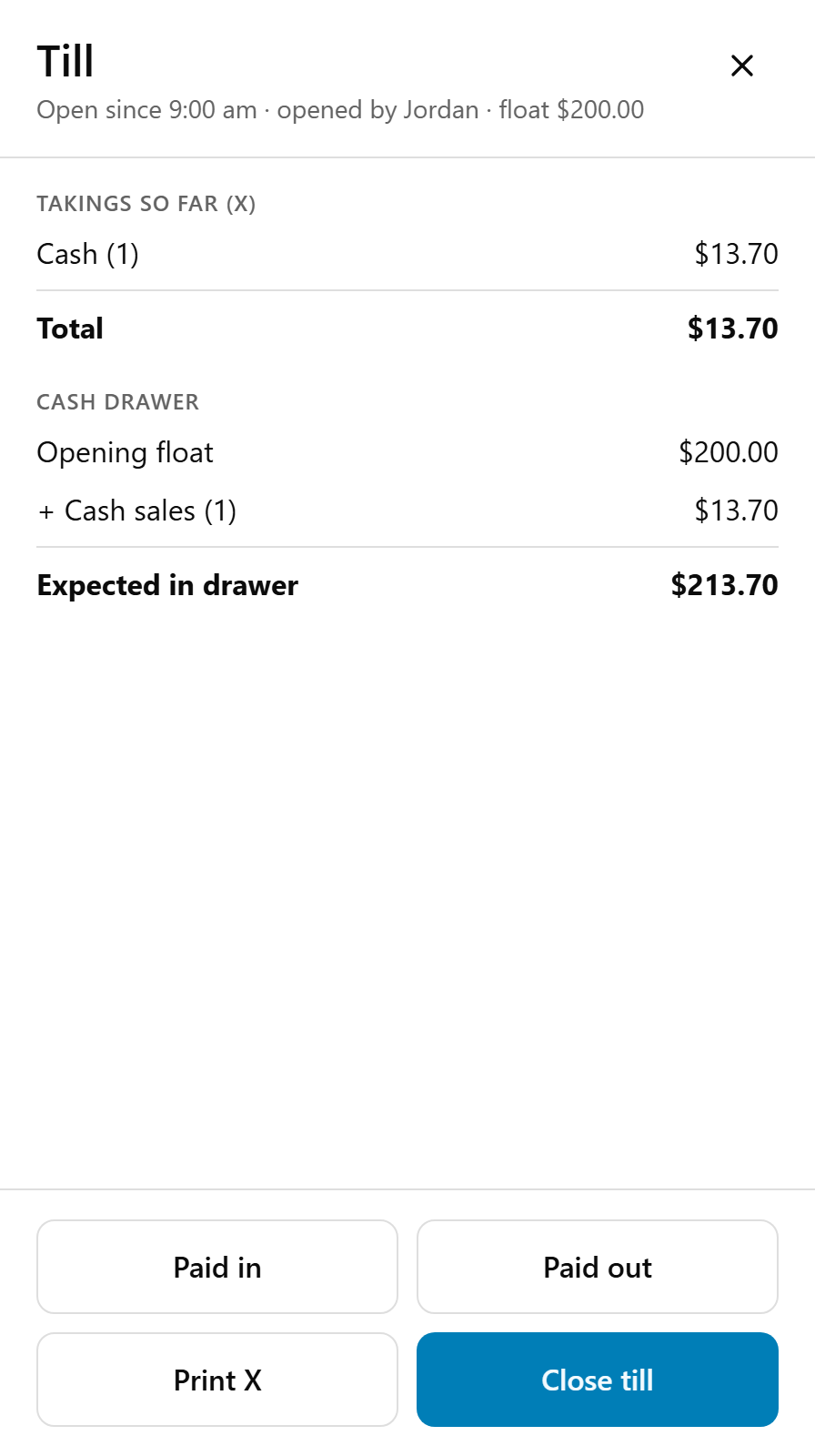
Cash refunds made on this POS come out of this drawer, even for a sale another device took. The sheet refreshes every minute and after each till action.
Print an X report
Select Print X. The POS says "The X report is printing. The till stays open."
Printing an X changes nothing, so print as many as you like. Any staff member can. It shows:
- X REPORT and "Not a close: the till stays open", the store, the device, and when the till opened and by whom.
- SALES: orders paid, gross, discounts, complimentary, fees and surcharges, net sales and GST.
- TAKINGS by tender, REFUNDS, and COMPLIMENTARY items given.
- CASH DRAWER down to Expected in drawer.
- ACTIVITY: No sales and drawer opens. BY STAFF: each person's takings, when you use staff PINs.
It ends "This device only. Online and kiosk orders are in the portal Sales Summary."
Where it prints
- The printer with Cash drawer ticked whose Opens for is this POS device; else
- a printer with Cash drawer ticked that opens for Every POS device; else
- your docket printer named
1, the one that prints every order.
Never a label printer, a KIOSK printer, or a printer with another name such as KITCHEN.
Print X is greyed out
No printer fits that rule. Under the buttons the POS says "To print X and Z reports here, tick Cash drawer on this till’s receipt printer in the merchant portal (Settings › Printers)."
Go to Settings → Printers, edit the receipt printer at this till and tick Cash drawer. See Connect a cash drawer to the POS. The POS picks it up within a minute. The figures on screen work either way.
If something is not right
| What you see | What to do |
|---|---|
| "No printer is set up for this till. In the merchant portal, Settings › Printers, tick Cash drawer on the receipt printer at this till." | Tick Cash drawer in Settings → Printers, as above. |
| "It could not be sent to the printer. Please try again." | Try again. |
| Print X worked but nothing printed | Check the printer is on and online. See The cash drawer doesn't open, or the till won't print. |
| A sale is missing from the takings | A till holds payments taken on its own POS device. Another device's sales are on its till. Kiosk and online orders are in Reports → Sales Summary. |