Everything on a card is designed to be read from across the kitchen. Here is what each part is telling you.
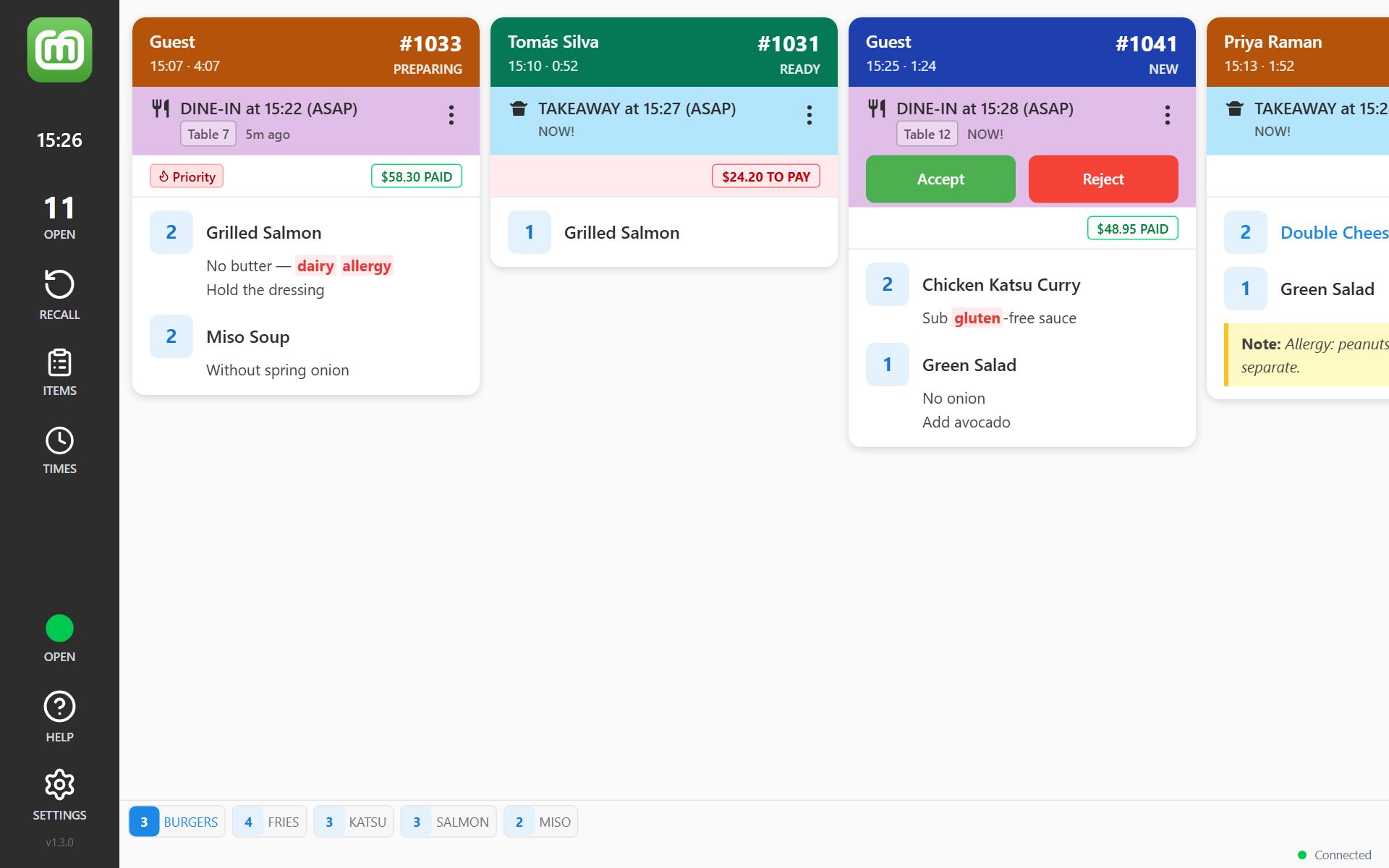
The header colour is the stage
The coloured bar across the top of each card shows which stage the order is at — New, Accepted, Preparing, Ready — not how late it is. The stage is also written under the order number. Every stage has its own colour. If the default is hard to read on your screen, pick one of four sets under Colour Theme in Settings → Display.
The header also shows the customer's name and the time the order came in. While Order Timer is on, a clock runs beside that time. It counts up from when the order arrived. For an order due later, it counts down to the due time, then up again once the order is overdue.
The flashing edge is the clock
Timing shows as a pulsing border around the whole card:
| Border | Meaning |
|---|---|
| Blue | A new order waiting to be accepted |
| Orange | Due within the next 5 minutes |
| Red | Past its due time |
A card with no pulse has been accepted and has more than five minutes to run.
POS orders sent through the Virtual Printer have no due time of their own: they count as due the moment they arrive, so their border pulses red straight away.
If your venue prefers the header colour itself to track time instead of the stage, a manager can switch on Timer Priority Colours in Settings → Kitchen → Timer. It only works while Order Timer is on. See Show how long each order has been waiting.
The band underneath is the order type
The coloured strip below the header names the order type — TAKEAWAY, DELIVERY, DINE-IN, DRIVE-THRU or IN-ROOM — with the due time and how long is left. A small tag carries the table number, room number, delivery company or car rego where there is one. Tap the tag for the details.
The band also holds the ⋮ button for the card's other actions.
POS orders sent through the Virtual Printer show no time in the band. A manager can hide the band on those orders with Show subheader in Settings → Virtual, while Auto-accept orders is on. The ⋮ button is hidden with it.
Payment and tags
Payment shows on the right, under the band:
- PAID in green, with the amount — paid
- TO PAY in red, with the amount, on a pale red strip — not paid yet. A part-paid order shows what is left to pay, with the amount already paid underneath
- FREE ORDER — nothing to pay
Where the payment method is known, its icon sits beside the amount. Tap the payment icon to see the payment details. For a card payment it reminds you: Sight customer card to verify cardholder before handover.
POS orders sent through the Virtual Printer carry no prices, so their cards show no amount or payment at all.
Tags show on the left — Priority, and others such as VIP, First Order or No Show. Tap a tag like No Show to see what it means.
Notes
Notes from the customer or the POS show in a yellow box headed Note: — under the item they belong to, or at the bottom for the whole order. Allergies come through the same way, as a note or a modifier. To make words like "gluten" or "nut" stand out in modifiers, a manager can add the Allergen Alert preset under Settings → Kitchen → Styling. It colours modifier lines only — a word in a note is never highlighted, so always read the notes. See Highlight items and allergens in colour.