Every time a POS till closes, the merchant portal keeps its Z report. Find it under Reports → Cash-ups to check a past day, see what was over or short, or print the Z report again.
Cash-ups shows only while cash management is on for your store. See Turn on the till (cash management) for your POS.
Find a cash-up
- In the merchant portal, go to Reports → Cash-ups. It opens on the last 7 days.
- Choose the From and To dates, and a Device, or All devices.
- Select View.
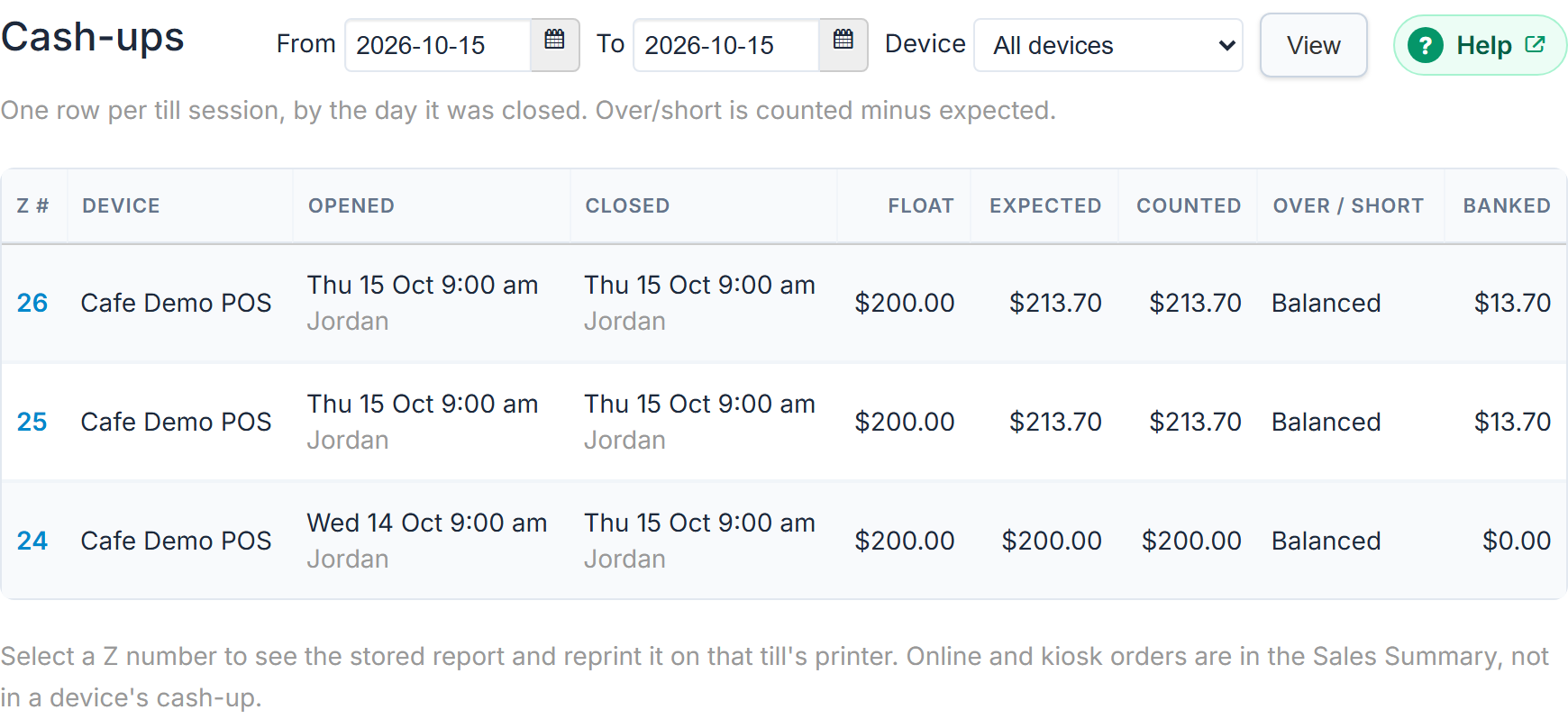
Cash-ups are listed by the day the till closed, newest first, in your store's time. A till opened in the evening and closed after midnight is on the closing day.
Tills still open come first, whatever the dates. Their Z # reads Open, Closed reads Still open with the live expected cash ("Live: expected $…"), and Over / short reads Not counted yet.
What each row shows
- Z #: the Z report's number.
- Device: the POS device login.
- Opened and Closed: when, and who, if you use staff PINs. "(started by a sale)" means nobody started it: the first sale did.
- Float: the float it opened with.
- Expected: the cash the drawer should have held.
- Counted: what staff counted at the close.
- Over / short: counted minus expected. Balanced, Over $… or Short $….
- Banked: the cash counted less the float left for the next till.
View the Z report
Select the Z number. Z report #42 opens, showing the Z report as it printed. It was stored at the close and never changes. It also shows the float left, the close note, sales, takings by tender, refunds, each paid in and out, and who did what.
For a till still open, select Open to see a live X report, Till still open (X).
Reprint at the till
- Open the Z report.
- Select Reprint at the till.
The portal says "The Z report is printing at the till". It prints marked REPRINT at the printer of the till it belongs to:
- the printer with Cash drawer ticked whose Opens for is that POS device; else
- a printer with Cash drawer ticked that opens for Every POS device; else
- your docket printer named
1, the one that prints every order.
Never a label printer, a KIOSK printer, or a printer with another name such as KITCHEN.
If something is not right
| What you see | What to do |
|---|---|
| No Cash-ups in Reports | Cash management is off. An admin turns it on in Users → POS devices. |
| "No cash-ups for the selected dates." | Widen the dates. Cash-ups are listed by the day the till closed. |
| "No printer is set up for Front counter. In Settings › Printers, tick Cash drawer on the receipt printer at that till (Opens for: that device, or every device), then reprint." (with your device's name) | Go to Settings → Printers, edit the receipt printer at that till and tick Cash drawer. Then reprint. See Connect a cash drawer to the POS. |
| "It could not be sent to the printer. Please try again." | Try again. |
| A till shows Open from days ago | Nobody has closed it. Close it on that POS: Till → Close till. Its Z report covers everything since it opened. See Close the till and print the Z report. |
| "Cash-ups are not available yet." | Contact us. |