Close the till at the end of the day or shift to cash up. You count the drawer, the POS shows whether it's over or short, you choose the float to leave for next time, and the rest is banked. The POS prints a numbered Z report and opens the drawer.
Before you start
- The till is on and open: the top bar shows Till · open. See Turn on the till (cash management) for your POS.
- Any staff member signed in with their own PIN can close the till. A manager isn't needed.
- Finish the last sale first. A payment taken after the close goes on the next till.
Close the till
- Select Till in the top bar, then Close till.
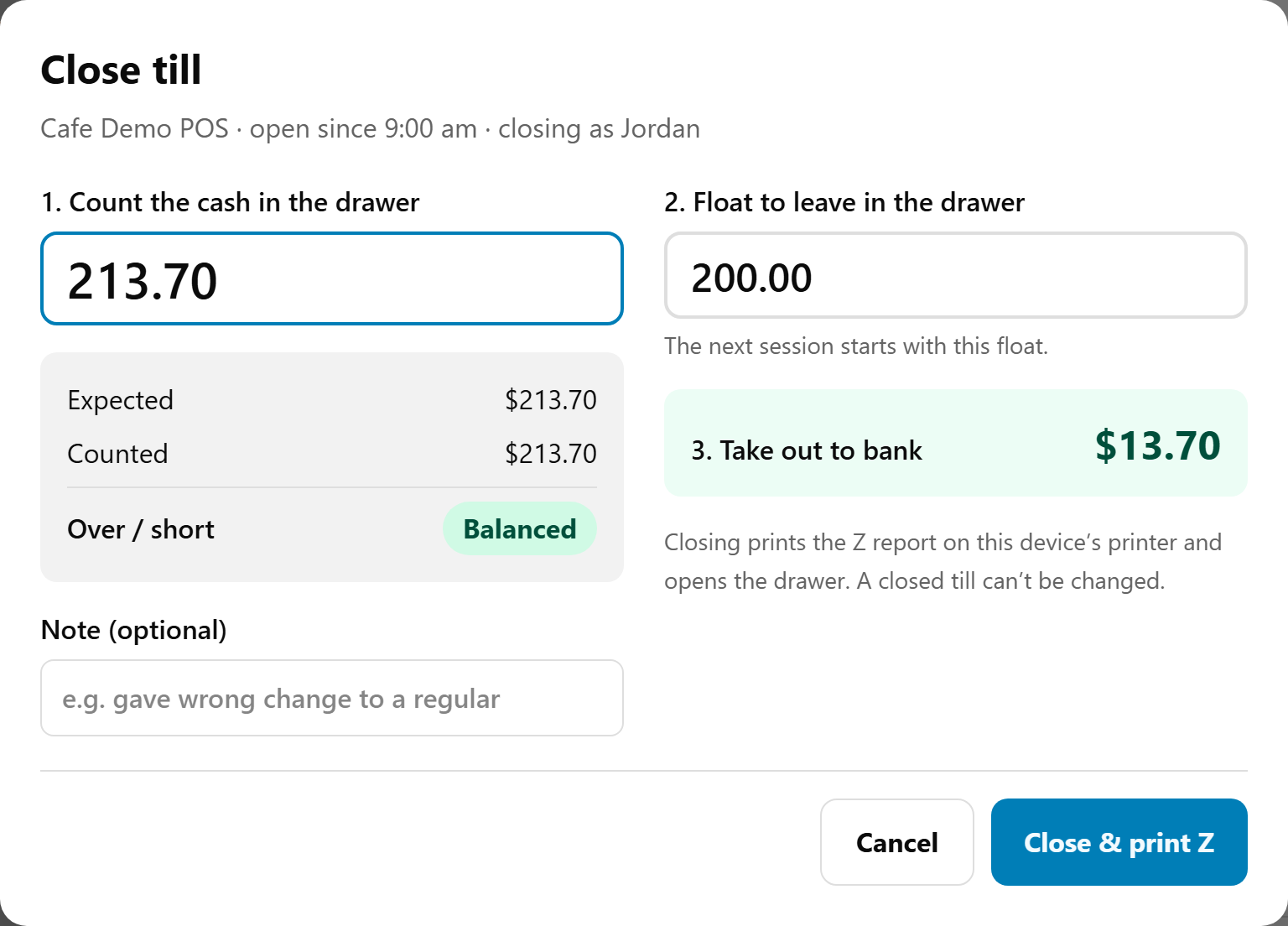
- Count every note and coin in the drawer. Type the total in 1. Count the cash in the drawer.
- Check Over / short (below). If it's out, count again. Add a Note (optional) to say why.
- Check 2. Float to leave in the drawer. It starts at the float the till opened with. Change it to leave more or less for the next shift. It can't be more than the cash counted.
- 3. Take out to bank shows the rest: the cash counted less the float.
- Select Close & print Z.
The drawer opens so you can take out the banking, and the Z report prints at this till's printer.
Over or short
The POS compares your count with Expected: the opening float, plus cash sales, less cash refunds, plus paid in, less paid out.
- Balanced, in green: the count matches.
- Over $1.00 means more cash than expected. Short $4.50 means less. Amber for under $10 either way, red for $10 or more.
Nothing stops you closing with a difference. It's recorded on the Z report and in the portal's cash-ups.
Done looks like
Till closed: Z #42, with Expected, Counted, Over / short, Float left, To bank and Takings (all tenders), and "The Z report is printing at this device’s printer." Select Done. The top bar's button reads Till again.
Z numbers count up across your store: with two POS devices, each close takes the next number.
A closed till can't be changed or reopened. The next till starts with the float you left: the POS offers it at the next sign-in, or the first sale starts it. See Start the till and count the float.
What the Z report shows
- Z REPORT #42, the store, the device, and when the till opened and closed, and by whom.
- SALES: orders paid, gross, discounts, complimentary, fees and surcharges, net sales and GST.
- TAKINGS by tender: Cash, EFTPOS, Card (own terminal) and Other / not recorded, with the total.
- REFUNDS by tender, and COMPLIMENTARY items given.
- CASH DRAWER: the opening float, cash sales, cash refunds, each paid in and out, Expected in drawer, Counted, Balanced, Over or Short, Float left, Banked and your note.
- ACTIVITY: No sales and drawer opens. BY STAFF: each person's takings, when you use staff PINs.
It covers this POS device only. Online and kiosk orders are in Reports → Sales Summary.
With no printer
When no printer is set up for this till, the button reads Close till instead of Close & print Z, and the POS says "No printer is set up for this till, so the Z report won’t print: it’s kept in the portal (Reports › Cash-ups), and can be reprinted there once the till’s printer has Cash drawer ticked." The close still works.
To fix it, go to Settings → Printers, edit the receipt printer at this till and tick Cash drawer. Then reprint the Z: see Find or reprint a past cash-up.
If something is not right
| What you see | What to do |
|---|---|
| "The float can’t be more than the cash counted." | Lower 2. Float to leave in the drawer. |
| "Sign in with your staff PIN first." | Your sign-in has ended, so the POS locks. Sign in and close the till again. |
| "The till isn’t open." | It's already closed, perhaps on another tablet sharing this login. Check Reports → Cash-ups. |
| "The till could not be closed. Please try again." | Nothing was saved. Try again. |
| A big over or short | Look for cash taken as another tender, a paid out not recorded, change given wrongly, or a second tablet on this login. |
| "No cash drawer opens for this till, so use the key." | The till is closed. Take out the banking with the key, then see the next row. |
| The drawer didn't open, or the Z didn't print | See The cash drawer doesn't open, or the till won't print. |