Take a customer's card over the phone, or when the EFTPOS terminal isn't working, by typing its details into the POS. Card (keyed) charges the card through your store's own online payment gateway and marks the order paid.
Available in POS version 4.4.0 and later. To see which version you have, select Manager, enter a manager's PIN and select Diagnostics. It's the App version under Build.
Before you start
Card (keyed) needs:
- Online payments switched on at your store, through your own online payment gateway. It isn't available on mypreorder's shared gateway.
- No third-party POS integration. It isn't offered at a store linked to a point-of-sale system under Settings → POS Integration (Kounta or Square, for example).
It's for the POS only. The customer app and the kiosk never offer it.
Who carries the risk
A keyed card has no check by the customer's bank (no 3-D Secure), so you carry the risk if the cardholder disputes the payment. A chargeback comes to you through your payment gateway, as it would for a card keyed in your gateway's own dashboard. Take keyed cards from customers you can reach, and keep the order's details.
Typing card details into any web form, this one included, comes with your own PCI DSS self-assessment. Your payment gateway or bank can tell you which questionnaire applies to you.
Switch it on
- Open Menu Builder, then Order Types & Payments.
- In the POS column, tick Use different settings if it isn't ticked already. Card (keyed) stays off while the POS follows the customer app, and its cell says "Tick Use different settings above to switch it on."
- Tick Card (keyed) in the POS column.
- Select Save Changes.
Done looks like "Order types and payments saved". The POS offers it at the next checkout, with no need to sign out. For the rest of the grid, see Choose how POS and Kiosk customers order and pay.
If the POS cell can't be ticked, it says why:
| The cell says | Why |
|---|---|
| Off: needs your own online payment gateway | Your store takes online payments through mypreorder's shared gateway. Contact us about setting up your own. |
| Off: online payments are off at this store | Online payments aren't switched on for your store. Contact us. |
| Off: not available with your payment gateway yet | Card (keyed) works with some payment gateways only, for now. |
| — Not with your POS integration | Your store is linked to a third-party point-of-sale system. |
Take a keyed card at checkout
- Add the items, then select Checkout · $X.
- Under Customer, enter the customer's Name.
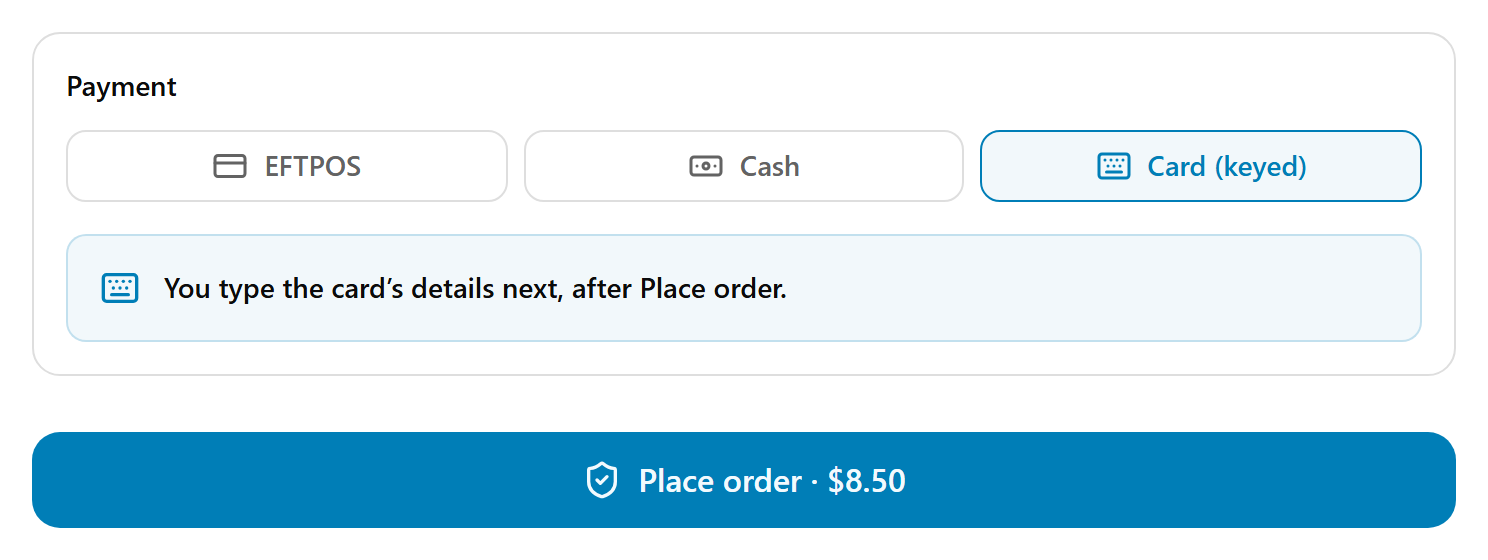
- Under Payment, choose Card (keyed). It says "You type the card's details next, after Place order."
- Select Place order · $X. The POS checks the order first, then opens Card (keyed).
- Type the Card number, Expiry, CVC and Name on card as the customer reads them out.
- Select Charge $X and place order.
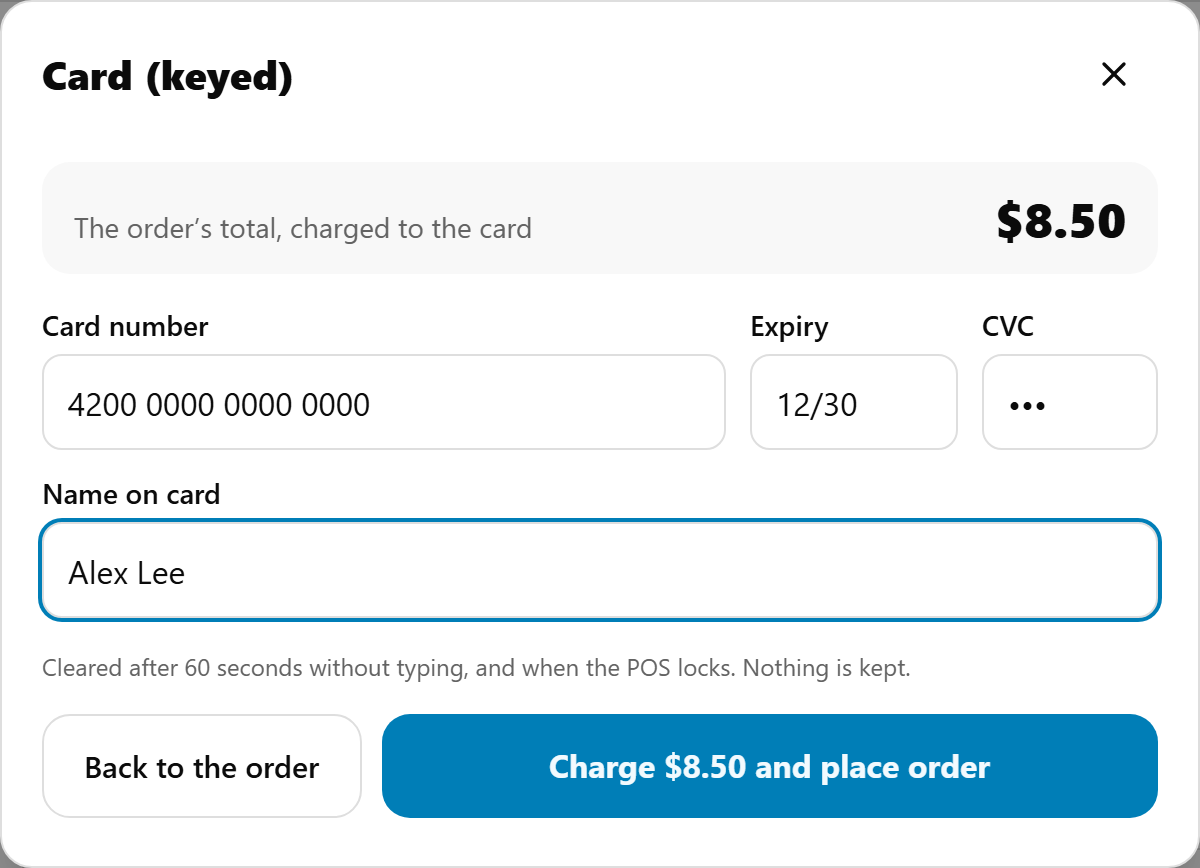
Done looks like the usual confirmation: Order placed, with the order paid.
If the order has an online surcharge, the card form says so: "Includes the $X online surcharge, shown on the order's totals." In Australia that's nothing since 1 October 2026.
Take a keyed card for an order in Orders
For an order that's waiting for payment, such as a phone order put through with Other:
- In Orders, select the order, then Take payment · $X.
- Choose Card (keyed): "Type the card's details: a phone order, or EFTPOS is down".
- Type the card's details, then select Charge $X.
Done looks like "#1234 is paid" with "Card (keyed) · Visa ····1111". No surcharge is added here.
The card's details aren't kept
The POS is a shared device, so the card form:
- clears after 60 seconds without typing, and when the POS locks;
- never offers to save the card, and masks the CVC;
- keeps only the card type and its last 4 digits once it's charged.
What the messages mean
| What you see | What to do |
|---|---|
| Card declined | The customer's bank declined it, with the reason below. Check the details and type the CVC again, or ask for another card. |
| No answer from mypreorder | The connection dropped. Check it, then select Charge again. The POS checks first, so the card is never charged twice. |
| Payment unconfirmed | Your payment gateway didn't answer, so we can't tell whether the card was charged. Look in your payment gateway's dashboard before charging again. Select Check again, or Start a new payment once you're sure it wasn't charged. |
| "Too many declined cards. Use EFTPOS, or try again at 2:45 pm." | Three cards were declined on this POS within 10 minutes, so keyed cards are paused on it for 15 minutes. That stops someone testing stolen card numbers. EFTPOS and cash still work. |
| Charged and refunded | The card was charged, but the order didn't go through, so the card was refunded. Try again. |
| "Refund $X in your payment gateway's dashboard." | The card was charged, the order didn't go through, and the refund to the card failed too. Refund it in your payment gateway's dashboard. mypreorder has been alerted. |
| "This order was already paid or cancelled. The card was refunded." | Someone else paid or cancelled the order while you were charging. Nothing more to do. |
| "A keyed card payment can be up to $2,000.00. Use EFTPOS for this one." | Keyed cards are limited to $2,000 a payment. The minimum is $1. |
| "Take cash, EFTPOS or a keyed card for credit: it can't go through as Other." | The order sells account credit. A keyed card can pay for it. |
Refunds and cancelling
A keyed card is refunded to the same card, through your payment gateway, from the POS Orders screen with a manager's PIN, as any other refund. The POS says "Refund $X to the card", then Refund to the card. It can take a few days to show on the customer's statement. A keyed card payment is refunded once, so choose the full amount you need.
Cancelling a paid keyed order refunds the card first, then cancels the order. A refund from the kitchen display goes back to the card too.
A card payment can be refunded only once from the POS. After a part refund, the POS says what's still on the card: refund that in your payment gateway's dashboard. Cancelling the order then goes ahead without a second refund, and says the same.
If the refund fails, the POS says "The refund to the card didn't go through. Try again, or refund it in your payment gateway's dashboard."
See Refund or cancel an order on the POS.
The till and reports
- The till: Card (keyed) is a tender of its own in the X and Z reports' takings. It's paid into your payment gateway, not the drawer, so it isn't in Expected in drawer, and the X report says so. Where staff sign in with their PINs, the Z report shows who took it.
- Sales reports: keyed sales are listed as Online - Card keyed at the POS (KEYED), and the order's payment shows as Card (keyed).
- The docket says PAID - CARD.
- Your mypreorder statement counts a keyed sale as an online order. The money settles in your payment gateway account, as your online orders do.