How customers pay in your app and online ordering is set in Menu Builder → Order Types & Payments, in the Customer app column.
On 3 October 2026 the Enable Online Payments and Enable Offline Payments (e.g. Cash) checkboxes, and the Modules checkboxes for pickup, dine-in and delivery, moved there from Menu Settings.
Turn a payment method on or off
- Open Menu Builder.
- Select Order Types & Payments in the left-hand list.
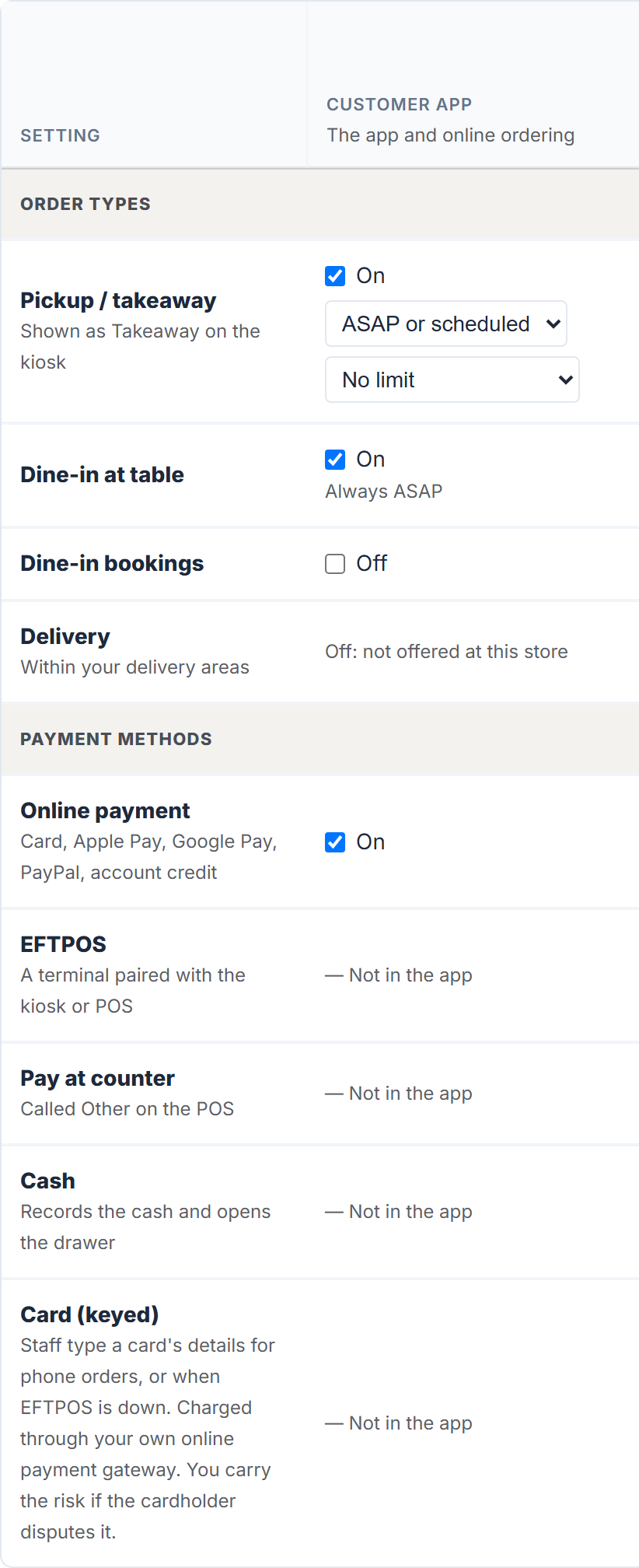
- In the Customer app column, under Payment methods, tick or untick:
- Online payment: card, Apple Pay, Google Pay, PayPal and account credit at the checkout.
- Pay at counter: the customer pays when they collect. They see it as In-store, or On Delivery for a delivery.
- Select Save Changes at the bottom of the tab.
Done looks like "Order types and payments saved". Keep at least one on, or saving stops with "Customer app: choose at least one payment method."
EFTPOS and Cash show — Not in the app: they are for the kiosk and the POS.
If a payment method isn't offered
- Online payment says Off: not offered at this store: your store has no online payment facility yet. See Apply for online payments and daily settlement.
- Pay at counter says — Not in the app, or isn't listed: paying on collection isn't offered for online orders at your store.
Pickup, dine-in and delivery
Under Order types in the same column, tick the ones you offer: Pickup / takeaway, Dine-in at table, Dine-in bookings and Delivery. A type that says Off: not offered at this store isn't switched on for your store. Keep at least one on.
How far ahead customers can order
For Pickup / takeaway and Delivery, choose the timing: ASAP only, ASAP or scheduled or Scheduled only. With scheduled times, choose how far ahead: Today only, Up to 1 day ahead to Up to 30 days ahead, or No limit.
The tab explains the limits: "No limit lets customers order as far ahead as their app allows: 90 days in the current app, one month in older (version 3) apps." Dine-in at a table is always ASAP, bookings are always scheduled, and menus with pickup locations, delivery slots or delivery stops keep their own schedules.
The kiosk and the POS
The Kiosk and POS columns follow the customer app until you tick Use different settings for them. See Choose how POS and Kiosk customers order and pay.
Still in Menu Settings
Menu Builder → Menu Settings, under Menu and Checkout → Preferences:
- Require registration (disable checkout as guest): customers must create an account. A promotion code limited to One use per customer can't be enforced against a guest, so turn this on if that matters to you.
- Enable Order Notes: the customer can type a note, which appears on the order card under NOTE FROM CUSTOMER:.
- Display Images: shows your product photos to customers.
Online store always open (ASAP orders at any hour) and the automatic open and close are under Trading Hours on the same tab. See Open or close your store for online orders. Select Save Settings after changing anything there.
A catering menu
If your store has catering, the Catering Menu section at the bottom of Menu Settings keeps its own Enable Online Payments, Enable Offline Payments (e.g. Cash) and Enable Payments by Invoice checkboxes.