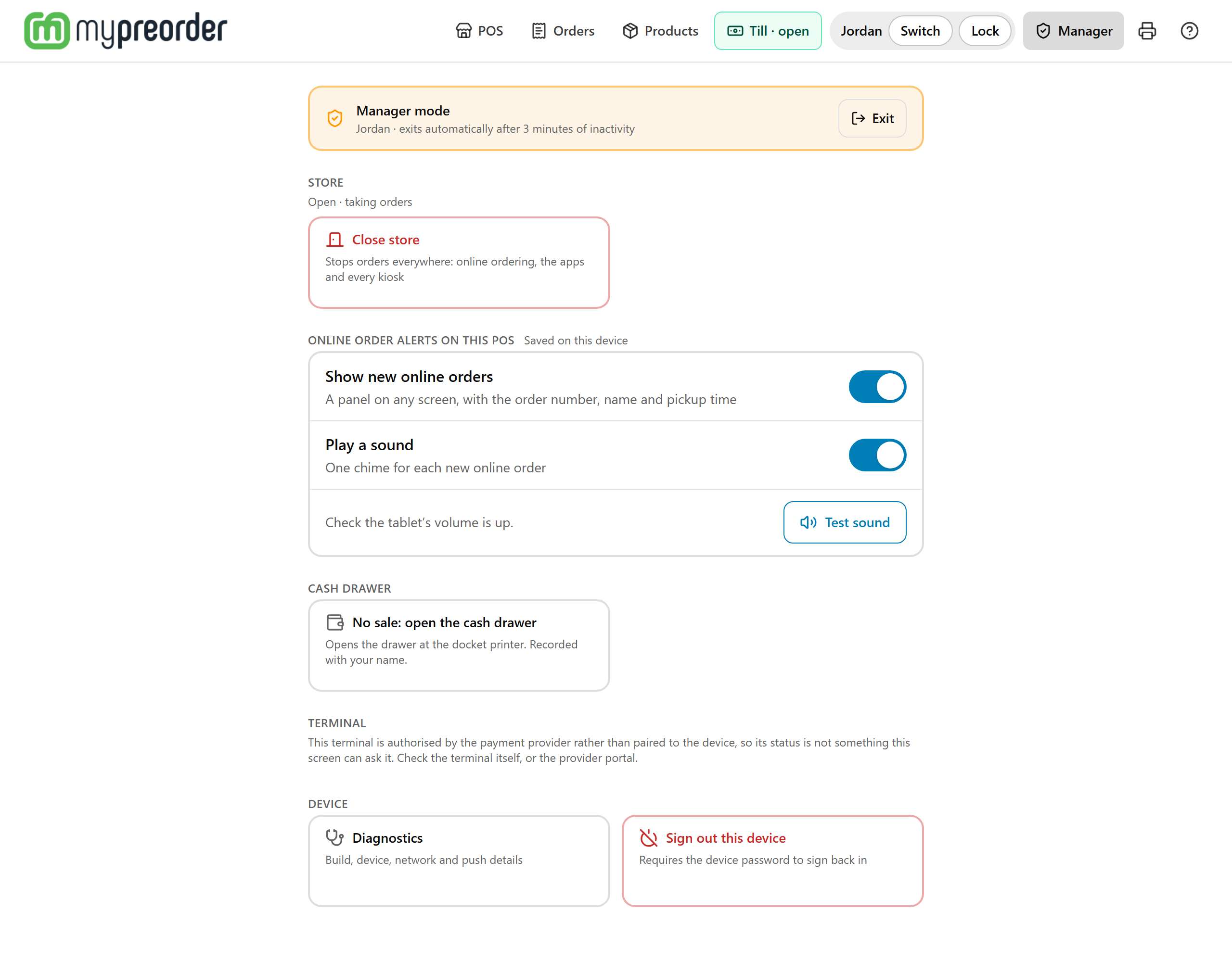
Manager mode holds the POS settings and actions that need a manager. Open it with a manager's PIN, and it closes by itself when nobody touches it.
Open manager mode
- Select Manager in the top bar (on a narrow screen, Staff tools → Manager).
- Manager access asks: "Enter your manager PIN. Ask a supervisor if you don't have one." Enter it and select Enter.
Which PIN: once your store has a Manager under Users → Staff, it's that Manager's own 6-digit staff PIN. Before then, it's the POS device's PIN (Device PIN on its row under Users → POS devices). A 4-digit staff PIN never opens it. See Give staff their own PIN for the POS and Kiosk.
Changed your mind? Cancel — back to ordering returns to the order you were building, as you left it.
Done looks like an amber Manager mode bar with the manager's name and "exits automatically after 3 minutes of inactivity". Exit goes back to the order. A refund running on the terminal keeps it open until it finishes.
What's in it
Last order on this device, the last order this POS put through (until the page is reloaded):
- Reprint docket sends its docket to your printers again, when your store has a docket printer. Any of today's orders can be reprinted from Orders too.
- Reprint card receipt prints the customer's EFTPOS receipt at a Linkly terminal.
- Refund this order, card-present: the customer must be there. To refund any of today's orders, use Orders: see Refund or cancel an order on the POS.
Store shows "Open · taking orders" or "Closed". Close store stops orders everywhere: online ordering, the apps and every kiosk. Tap it, then Tap again to close the store. Open store starts them again the same way. See Open or close your store for online orders.
Online order alerts on this POS are saved on this device, so a back counter can be quiet while the front one chimes:
- Show new online orders: the panel that pops up on any screen.
- Play a sound: one chime for each new online order.
- Test sound: plays the chime. Not heard? Check the tablet's volume.
Cash drawer: No sale: open the cash drawer opens it at the docket printer, recorded with your name. The POS says "Sent. The drawer opens in a moment; if it doesn't, use the key."
Terminal: Check terminal asks a Linkly pinpad whether it's responding. Pair terminal again pairs a new or swapped pinpad: see Pair a Linkly pinpad again. A Tyro terminal shows a note instead, because Tyro authorises it.
Device:
- Diagnostics: build, device, network and push details, for when we're helping you. Opening it leaves manager mode, so enter the PIN again to come back.
- Sign out this device: tap it, then Tap again to sign out. Signing back in needs the POS device's email and password, so the POS can't take orders until someone with them comes.
When it closes
Manager mode exits after 3 minutes without a tap, when you select Exit, and when someone selects Lock or Switch. The PIN screen itself goes back to the order after a minute untouched.
If you go to another screen (the till, Orders) without selecting Exit, manager mode stays open for about 4 minutes. Come back later than that and the POS asks for the PIN again, saying "Manager mode timed out. Enter your manager PIN to carry on." It also closes after 15 minutes in all, however busy you are.
If something is not right
| What you see | What to do |
|---|---|
| "Incorrect PIN." | Check the PIN. It's 6 digits. |
| "Too many incorrect PINs." and "Try again in" a countdown | Wait for it, or ask an admin to select Clear lockout on the device's row under Users → POS devices. |
| "Manager mode timed out. Enter your manager PIN to carry on." | Manager mode closed while you were on another screen, or reached its 15 minutes. Enter the PIN, then select what you wanted again (No sale, a refund): it wasn't done. |
| "No printer opens a cash drawer for this POS. Set one up in Settings > Printers." | No printer has Cash drawer ticked for this POS: its Opens for may name another device. It's in Settings → Printers. See Connect a cash drawer to the POS. |
| "No card terminal is configured for this device. Orders are taken without EFTPOS." | No pinpad is assigned to this POS device. See Connect a Linkly EFTPOS pinpad to a POS or Kiosk. |
| No Last order on this device | The POS hasn't taken an order since the page was loaded, or there's nothing to do with it: no docket printer and no terminal for a refund or reprint. |
| "This browser didn't play it yet. Tap Test sound again." | Browsers play sound only after a tap. Tap Test sound again. |