Take payment as you put an order through the POS: on the EFTPOS terminal linked to it, in cash, or another way with Other.
Put the order through
- Add the items, then select Checkout · $X (on a phone, Review order).
- Under Customer, enter the customer's Name. Email and Mobile are optional. If you added a customer with Find customer, their details are filled in from their account instead: see Find a customer and add them to a POS order.
- Under Payment, choose EFTPOS, Cash or, where it's switched on, Other, then follow the section below. Where it's switched on, Card (keyed) takes a card over the phone: see Take a card over the phone (keyed card).
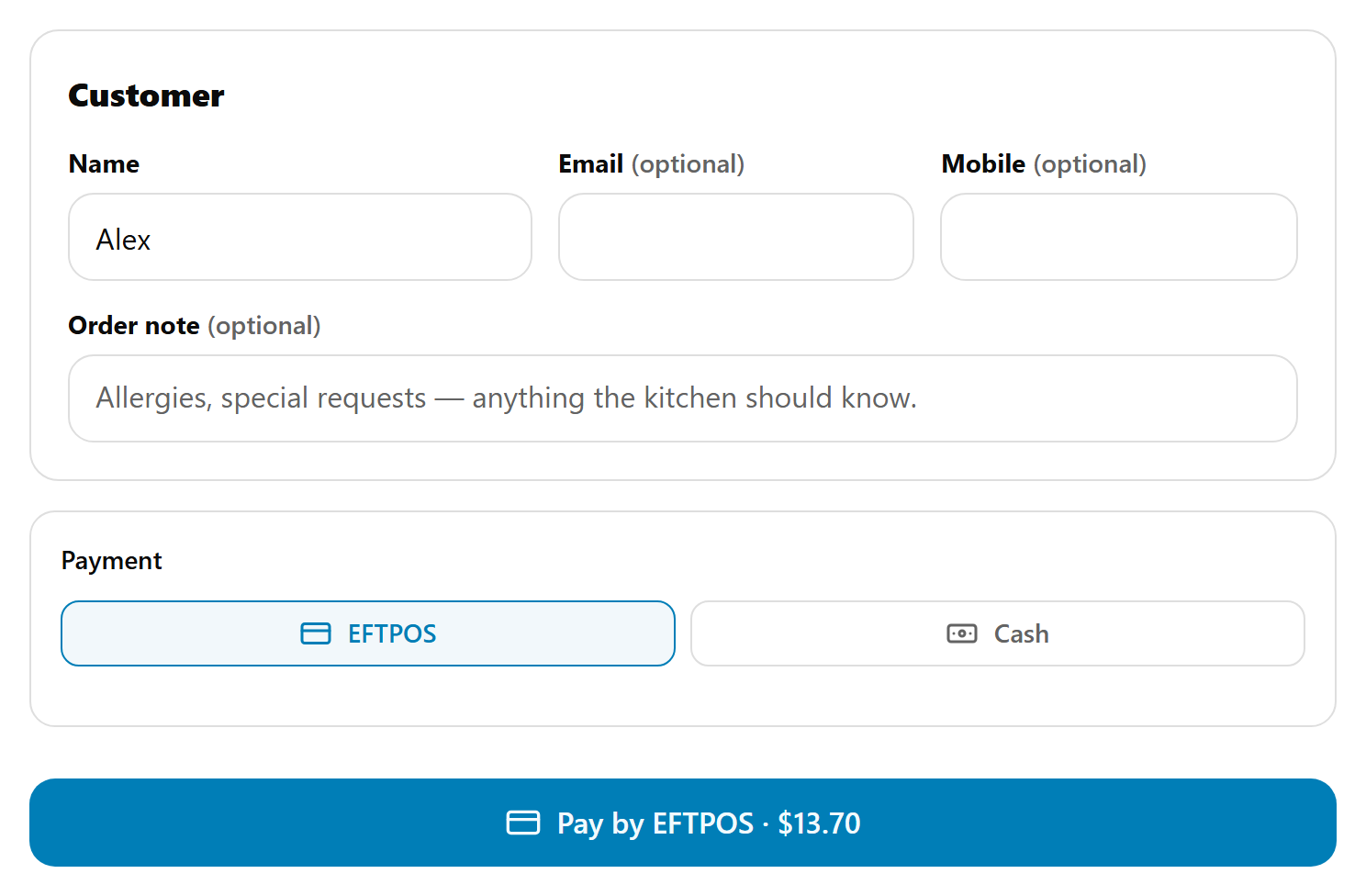
Which tabs show is set by an admin in Menu Builder → Order Types & Payments: see Choose how POS and Kiosk customers order and pay. EFTPOS shows only when this POS has a paired terminal. Cash isn't offered at a store connected to your point-of-sale system (Square, Kounta and so on).
EFTPOS
- Select EFTPOS, then Pay by EFTPOS · $X.
- The pinpad asks for the card: "Present your card". The customer taps, inserts or swipes.
- "Approved" and "Placing your order…", then the confirmation.
If the card is declined, the POS says "Card declined". Select Try payment again, or Use a different payment method.
Cash
- Select Cash.
- Tap what the customer hands you: Exact $X or one of the note amounts. For any other amount, type it in Other amount.
- Change due shows the change. Until the cash covers the total it says "Enter at least $X".
- Select Place order · Cash $X.
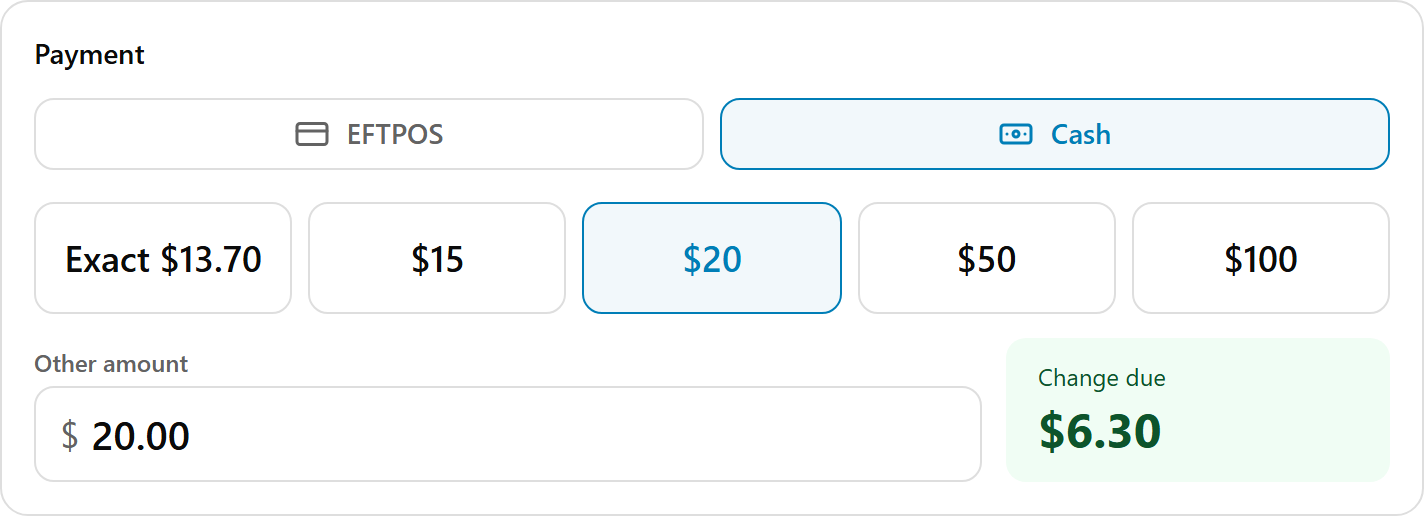
The confirmation shows Paid · Cash and a Change card with the change to hand back, the total and what was tendered.
Cash rounding. Cash is rounded to the nearest 5c in Australia and 10c in New Zealand. The order's total stays exact. When rounding changes the amount, a line says so, for example "Total $12.42 · Rounding -$0.02 · To pay in cash $12.40".
The cash drawer opens when the order's docket prints, usually within a few seconds. If it doesn't, check the printer has paper (it won't open the drawer without it), and use the key. It needs a drawer set up on the docket printer: see Connect a cash drawer to the POS.
With the till on, cash taken on the POS counts under Cash sales towards Expected in drawer. See Close the till and print the Z report.
Other
Use Other for a voucher, a bank transfer, an account, or a card taken on a terminal that isn't linked to the POS.
- Select Other, then Place order · $X. The order goes to the kitchen unpaid.
- The confirmation shows Unpaid · collect payment and asks Has it been paid?
- Choose how, then select Mark paid:
- Cash: taken in cash.
- Card on another terminal: a terminal that isn't linked to the POS.
- Other: a bank transfer, a voucher or an account.
- Or select Not yet, they'll pay later. Nothing is recorded, and the order waits in Orders under Needs payment. See Find and take payment for orders on the POS.
Done looks like "Marked paid · Cash" (or the way you chose). Marking it paid never opens the cash drawer.
The confirmation
Order placed, the order number in large type, the customer's name, the order type and time, and Paid, Paid · Cash or Unpaid · collect payment. Select Next order to start the next customer from an empty order.
If the EFTPOS link isn't working
You can keep trading while the pinpad isn't talking to the POS:
- Take the card on the terminal by itself, the way you would without the POS.
- Put the order through with Other.
- Answer Has it been paid? with Card on another terminal, then select Mark paid.
No Other tab? An admin turns on Pay at counter for the POS in Order Types & Payments (it's called Other on the POS). The POS picks it up at the next checkout, with no need to sign out.
Where Card (keyed) is switched on, you can type the customer's card details into the POS instead: see Take a card over the phone (keyed card).
If something is not right
| What you see | What to do |
|---|---|
| No EFTPOS tab | The POS has no paired pinpad, or EFTPOS is off for the POS. See Sign in a POS or Kiosk and pair the EFTPOS terminal. |
| No Cash tab | Cash is off for the POS in Order Types & Payments, or the store is connected to your point-of-sale system. |
| Place order · Cash $X is greyed out | No amount is chosen yet, or it's less than the cash amount. Tap Exact $X or a note amount, or type at least that much in Other amount. |
| "Terminal is busy" | Another transaction is running on the pinpad. Wait for it to finish, then try again. |
| "Take cash or EFTPOS for credit: it can't go through as Other." (or "Take cash, EFTPOS or a keyed card…") | The order sells credit. See Sign a customer up at the POS or Kiosk. |
| The drawer doesn't open | Use the key, then see The cash drawer doesn't open, or the till won't print. |